
AI Background Remover for web-to-print uploads
Customer upload background removal in your product designer
Cmsmart Ecommerce adds background removal to your WooCommerce product designer. A buyer selects an uploaded image, picks a subject type and output, refines the edge with Erase, Restore or Smart Select, and applies it, so the order arrives with usable artwork instead of a request for a better file.

Select an uploaded photo and the image toolbar offers Remove background and Upscale. Demo capture.
In short
What this does for your store
For web-to-print stores that want a product designer background removal tool their buyers use before ordering.
Customer-upload background removal: removing the background of artwork a buyer uploads inside the store's product designer, so the transparent cut-out goes straight into the order's print file.
- Runs in
- The buyer's designer
- Options
- Subject type, edge, high detail, output
- Refine
- Erase, Restore, Smart Select, zoom, undo
- Checked against
- Plugin 2.17
The business moment
What happens when customers upload artwork you cannot use?
Web-to-print buyers upload what they have: a phone photo, a screenshot, a logo from a website. The background comes with it, and so does the support work.
- Staff email buyers asking for a transparent version they do not know how to make.
- Orders wait while artwork goes back and forth.
- Buyers leave the designer when the upload looks wrong and they cannot fix it.
- Hand cut-outs by staff are slow and are not charged for.
How it works inside WooCommerce
How a buyer removes a background in your designer
One tool, deep: the options the buyer sees, the refine step and what staff receive.
- Buyer uploadsIn the plugin today
- Select, then Remove backgroundIn the plugin today
- Choose options and refineIn the plugin today
- Apply and ProcessIn the plugin today
- Order with edited artworkIn the plugin today
- Bulk cut-out of an existing libraryCustom development
-

Choose the options
Remove background with AI: subject type, edge softness, high-detail mode and transparent or white output.
-
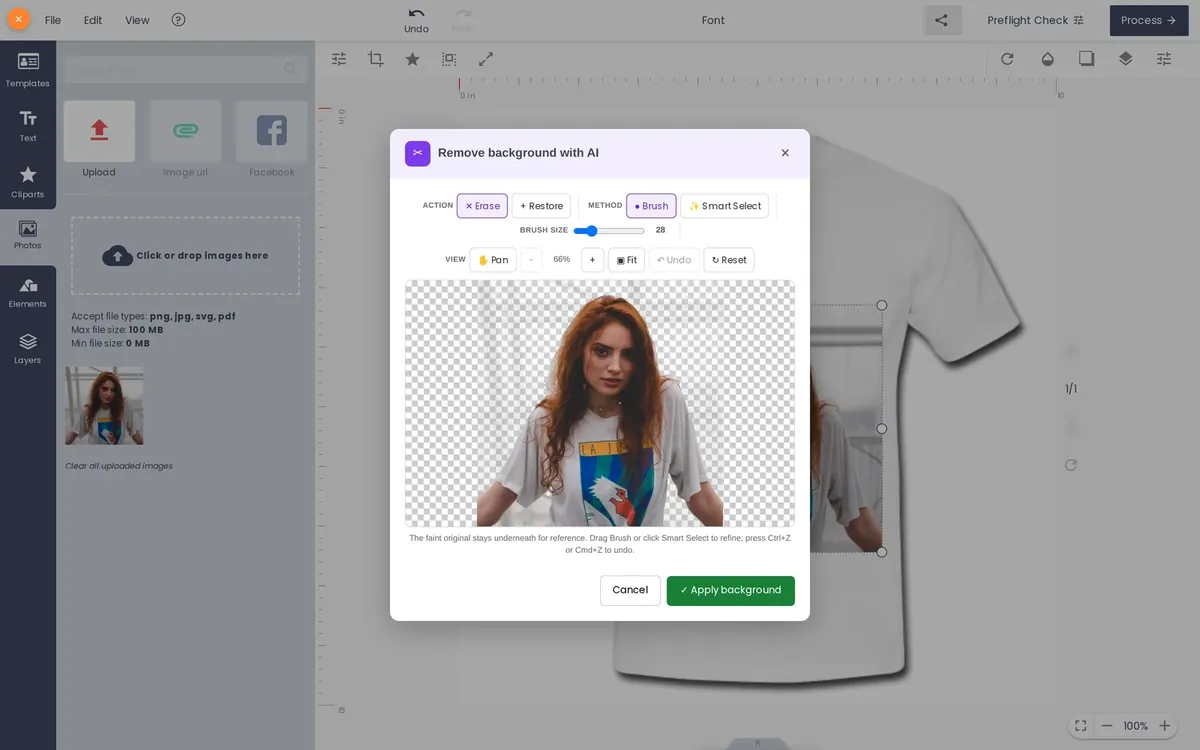
Refine before applying
The cut-out on a transparent grid with Erase, Restore, Smart Select, brush size, zoom and undo.
-

Saved as Your artwork
After Process, the edited design is saved next to Add to cart.
-

Staff receive the order
The order carries the customer design and an AI Preflight panel.
Real captures from the Cmsmart demo store (order #1670 and test products). Customers, orders and data are demo data.
Requirements
What can the buyer choose?
These are the options in plugin 2.17.
| Item | Value | Source |
|---|---|---|
| Subject type | Auto-detect, Person, Product, Logo, Text, Hair or fur | Cmsmart plugin 2.17 |
| Edge softness | 0 (hard cut) to 10 (feathered); default 3 | Cmsmart plugin 2.17 |
| High-detail mode | Optional, meant for hair and fur, adds about 10 seconds | Cmsmart plugin 2.17 |
| Output background | Transparent (PNG) or white | Cmsmart plugin 2.17 |
| Refine tools | Erase, Restore, brush or Smart Select, zoom, pan, undo and reset | Cmsmart plugin 2.17 |
| File size and formats | Not stated in the plugin, so no figure is printed here | Cmsmart plugin 2.17 |
Other tools publish their own limits, for example a 12 MB per layer and 50 MP cap in Printful's tool. Cmsmart makes no such claim.
Recommended settings
Recommended settings by upload type
Every option below exists in plugin 2.17. The recommendation is our starting point; test it on your own artwork.
| Setting | Start with | Why |
|---|---|---|
| Logo or graphic upload | Subject: Logo or Text; high detail off | Gives clean edges on flat artwork. |
| Portrait photo | Subject: Person; edge softness near the default | A little softness blends skin and hair. |
| Product photo | Subject: Product; white output if the product has a white background | Matches how the product will print. |
| Hair or fur | Subject: Hair or fur; high detail on | The mode built for fine strands. |
| Who may use it | Everyone, Members, or Customers who have ordered | Pick the audience that fits your token budget. |
Cost
How is it paid for?
AI runs on tokens from the store owner's Cmsmart wallet, so your buyers never see a charge. Tokens come with a monthly plan and the balance resets at each renewal. This page does not print a per-use cost; the live plans and balance are on AI credits and in your dashboard.
Comparison
Ways to let customers fix their uploads
Written by the Cmsmart team, who make this tool. Competitor facts come from vendor pages, checked on 6 October 2026; anything a page does not state is marked as not stated.
| Question | Cmsmart in your own store | Ask the customer to use an online tool | Staff cut-out by hand | Another web-to-print vendor |
|---|---|---|---|---|
| Where it runs | Inside your WooCommerce designer | On a third-party site | On a staff computer | Inside that vendor's editor (PressCentric announced automatic removal on customer uploads) |
| Who does the work | The buyer, in one flow | The buyer, in a second flow | Your staff | The buyer |
| Refine tools | Erase, Restore, Smart Select | Varies by tool | Full editor | Not stated here |
| Pricing model | Tokens from your Cmsmart wallet | Free tier or per image | Staff time | Not stated here |
| Best for | WooCommerce web-to-print stores | Shops that cannot change the designer | Difficult artwork | Shops on that vendor |
Where the others win
- Telling a buyer to use a free online tool costs you no tokens.
- A staff cut-out gives the finest result on difficult artwork.
- A vendor's own editor is the natural choice if you already run it.
Sources (checked 6 October 2026): PressCentric release note · Printful background removal tool · remove.bg API. Product names are trademarks of their owners.
Be clear before you start
What does it not do?
- It works on images the buyer places in the designer. It does not touch your catalogue photos and has no batch mode.
- It does not promise a perfect edge on every image; the refine step exists for that.
- Maximum file size and accepted formats are not stated in the plugin.
- The dashboard pages explain the tool; it runs in your store's designer.
- Bulk cut-out of an existing artwork library is custom development.
Go further with custom development
Need more than the plugin does today?
We build these as scoped projects on your WooCommerce store, tracked in WorkSuite like every client project. Talk to an ecommerce expert and we will quote it.
- Bulk cut-out of an existing library
- Per-product defaults for subject type
- A review queue for edited uploads
- A preflight gate before checkout
Real numbers, real clients
Trusted by store owners in 80+ countries
What we have delivered since 2012, and what customers say about working with us.
- 6,300+ client projects since 2012
- 4,600+ projects delivered since 2012
- 1,800+ live stores online now
- 80+ countries clients worldwide
- 500+ custom development projects since 2012
- 120+ engagements running 5+ years ongoing support
Since 2012 · a Netbase JSC company · as of Sep 2026 · source: WorkSuite project records
Rated by customers on third-party sites (as of Sep 2026)
Teams in 80+ countries run their ecommerce projects with Cmsmart


NBDesigner is a very robust plugin for printing shops. It may take a bit of time to learn, as I am, but the support team is there to help. I've been in printing 30 years and I am impressed with how the developers have thought this plugin through. It has everything.
 Pamela Redman

 Verified on Trustpilot
Plug in is so good. Please make toturial video step by step. Selena answered the question well, but I wish it had been faster.
 วชิระ เชื้อผู้ดี
Verified on Trustpilot
วชิระ เชื้อผู้ดี
Verified on Trustpilot
Great software and excellent support! NBDesigner is a fantastic tool – very intuitive and easy to use. It makes the customization process smooth and efficient. The support team is also incredibly helpful, responsive, and professional. I use it on my website, and it works perfectly. Highly recommended!
 Khanh Nguyễn Đức
Verified on Trustpilot
Khanh Nguyễn Đức
Verified on Trustpilot
Read more testimonials Delivered & maintained with WorkSuite: tickets, tasks, milestones and invoices in one place. See how it works
FAQ
Frequently asked questions
Which subject types can a buyer choose?
Auto-detect, Person, Product, Logo, Text, and Hair or fur. Pick Logo or Text for flat graphics, Person for portraits and Product for product shots. High-detail mode is meant for hair and fur and adds about ten seconds.
Can a buyer fix the cut-out by hand?
Yes. After the AI runs, the refine step offers Erase and Restore with a brush or Smart Select, plus zoom, pan, undo and reset. The original stays faintly visible underneath so the buyer can see what to bring back.
What is the difference between transparent and white output?
Transparent gives a PNG with no background, right for printing on coloured products. White output suits a product printed on a white background. The buyer chooses in the options before running the tool.
Where does the processing happen?
On Cmsmart Cloud, triggered from the buyer's designer. The result returns to the designer for refining, and tokens are spent from the store owner's wallet, never from the buyer.
Is there a maximum file size or a list of accepted formats?
The plugin does not state either, so this page prints no figure. Other tools publish their own caps. If a limit matters for your shop, test your typical uploads on the free licence first.
Can I run it over my existing artwork library?
No. It works on images placed in the designer and has no batch mode. A bulk cut-out of an existing library is custom development that we can scope and quote.
How do I contact Cmsmart or get a quote?
Message the Cmsmart team on WhatsApp at +84 937 869 689 or email project@cmsmart.net; the contact page at cmsmart.net/contact lists every channel, and Request a quote (cmsmart.net/project-proposal) sends a project brief. Customers with a licence open a ticket from the dashboard.
Keep reading
Related guides and tools
Get started
Give your buyers a cut-out tool in your own designer
Get a free licence, install the plugin and try the tool in your designer. The dashboard explains the tools; it does not run them. Or tell us what your print workflow needs.

Cmsmart Ecommerce provides custom ecommerce and WooCommerce development services for web-to-print, product personalization, plugin support and API integration.




Web-to-print, WooCommerce, B2B and AI specialists who plan, build and support stores together.
Meet the team →
Top