Cmsmart B2B: sell to companies, not just to customers
A full B2B store solution for Cmsmart Ecommerce on WooCommerce: the Cmsmart B2B plugin, the Cmsmart B2B Store and everything in Fullstore and Premium, on one plan.
Cmsmart B2B gives each business client a company account with a team, its own prices, quotes, approvals, budgets and invoices on terms, on top of Cmsmart Product Designer for WooCommerce. It is sold as a full store solution: one plan includes the Cmsmart B2B plugin and the rights of Fullstore and Premium. The Cmsmart B2B plugin and the Cmsmart B2B Store come in one package in your dashboard — no separate purchase, activated with your plan key. A trial key works during the trial.
Sold as
A full store solution with Cmsmart Product Designer 2.18 or newer
Runs on
WordPress 6.0+, WooCommerce 8.0+
Licence
The Cmsmart B2B plan on your Cmsmart key
Also includes
Cmsmart B2B Store, Fullstore and Premium rights
What is included
One plan, three parts
The Cmsmart B2B plugin brings the company layer and the Cmsmart B2B Store gives it a storefront, and the rights of Fullstore and Premium keep the rest of your store covered. The Cmsmart B2B plugin and the Cmsmart B2B Store come in one package in your dashboard — no separate purchase, activated with your plan key (a trial key works during the trial).
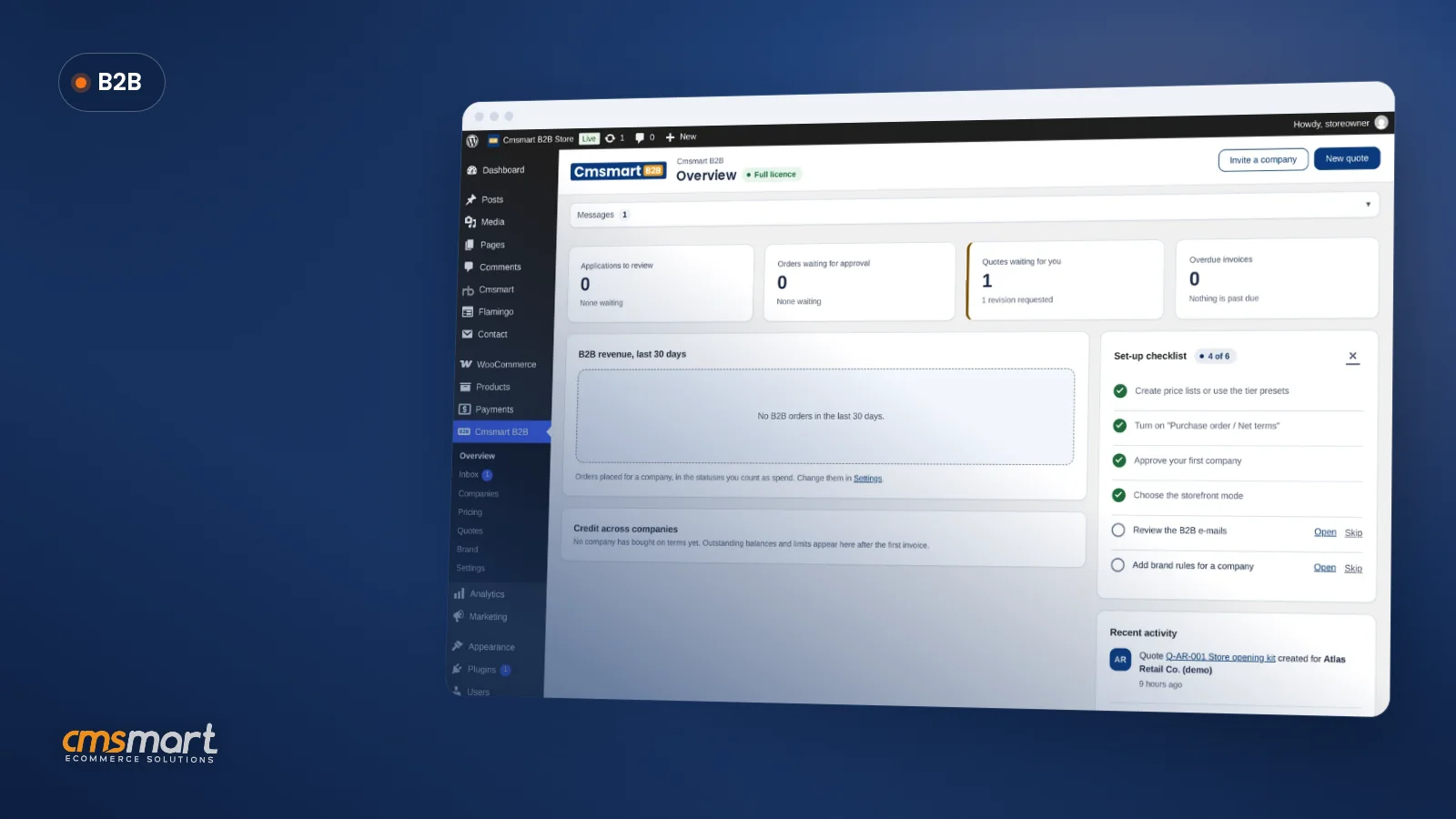
Product screenshot, fictional demo data
A full B2B store solution
Companies, price lists, quotes, approvals, budgets, terms with invoices paid online, reports and the Buyer Account, built into the Cmsmart B2B plugin, which runs on top of Cmsmart Product Designer 2.18 or newer and comes in the same package: no separate purchase. Sign-in, application and quote pages open quickly, and the cart, checkout and Buyer Account stay light.
Product screenshot, fictional demo data
The Cmsmart B2B Store
A ready-made storefront for a private ordering portal: a mega menu by category with a Business accounts panel, catalogue filters, a list view for ordering many products at once, search by SKU in the header, company prices for signed-in buyers, sign-in prompts for guests and a footer with your store's contact and payment details. A free download from your dashboard, installed with your licence key; a trial key works during the trial.
Plugin capture
Premium and Fullstore rights
Everything in Cmsmart Fullstore and Cmsmart Premium: Product Designer Pro features, updates while your plan is active, and the ready-made stores for your niche.
Get started
How do you launch the Cmsmart B2B Store?
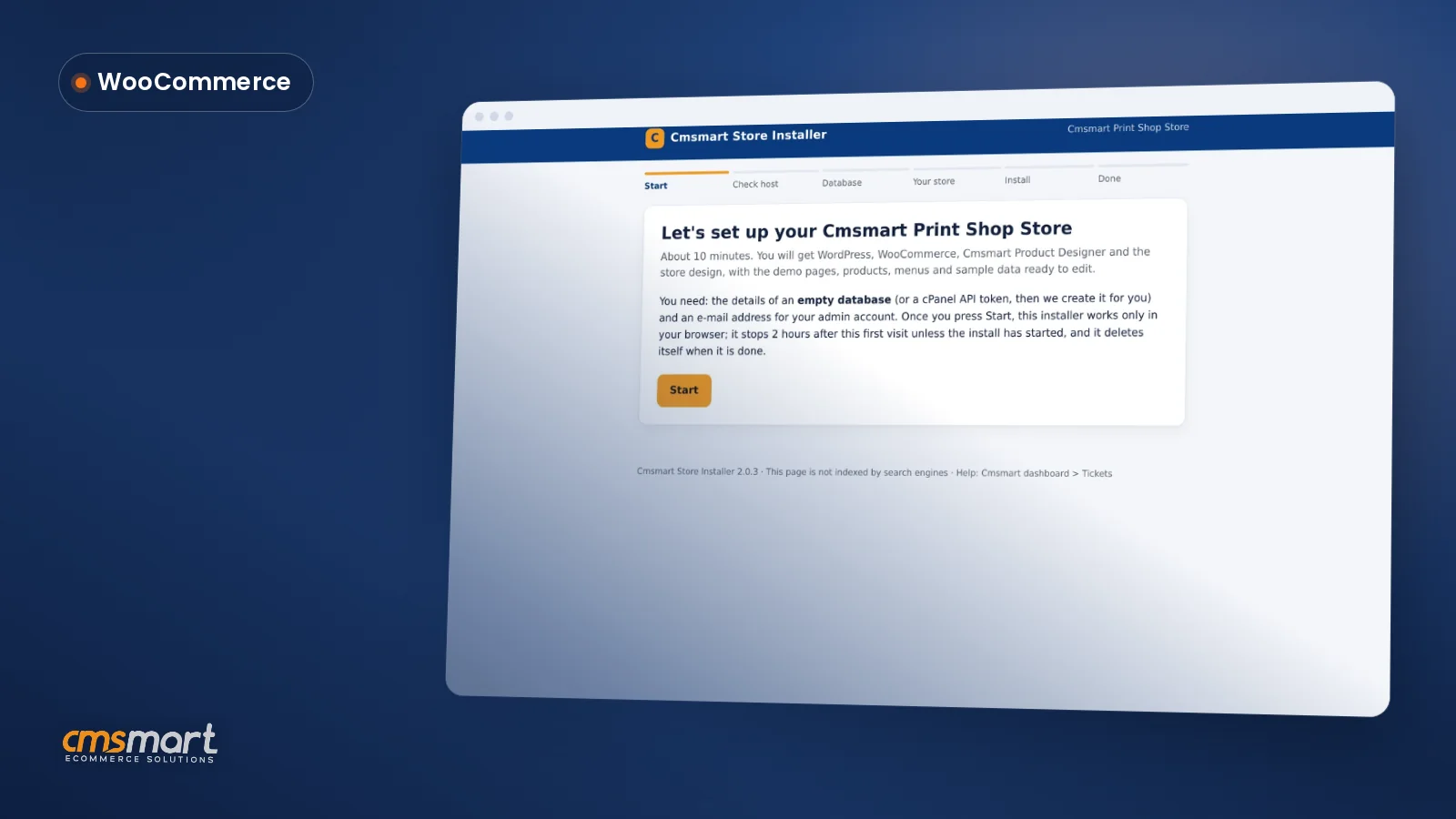
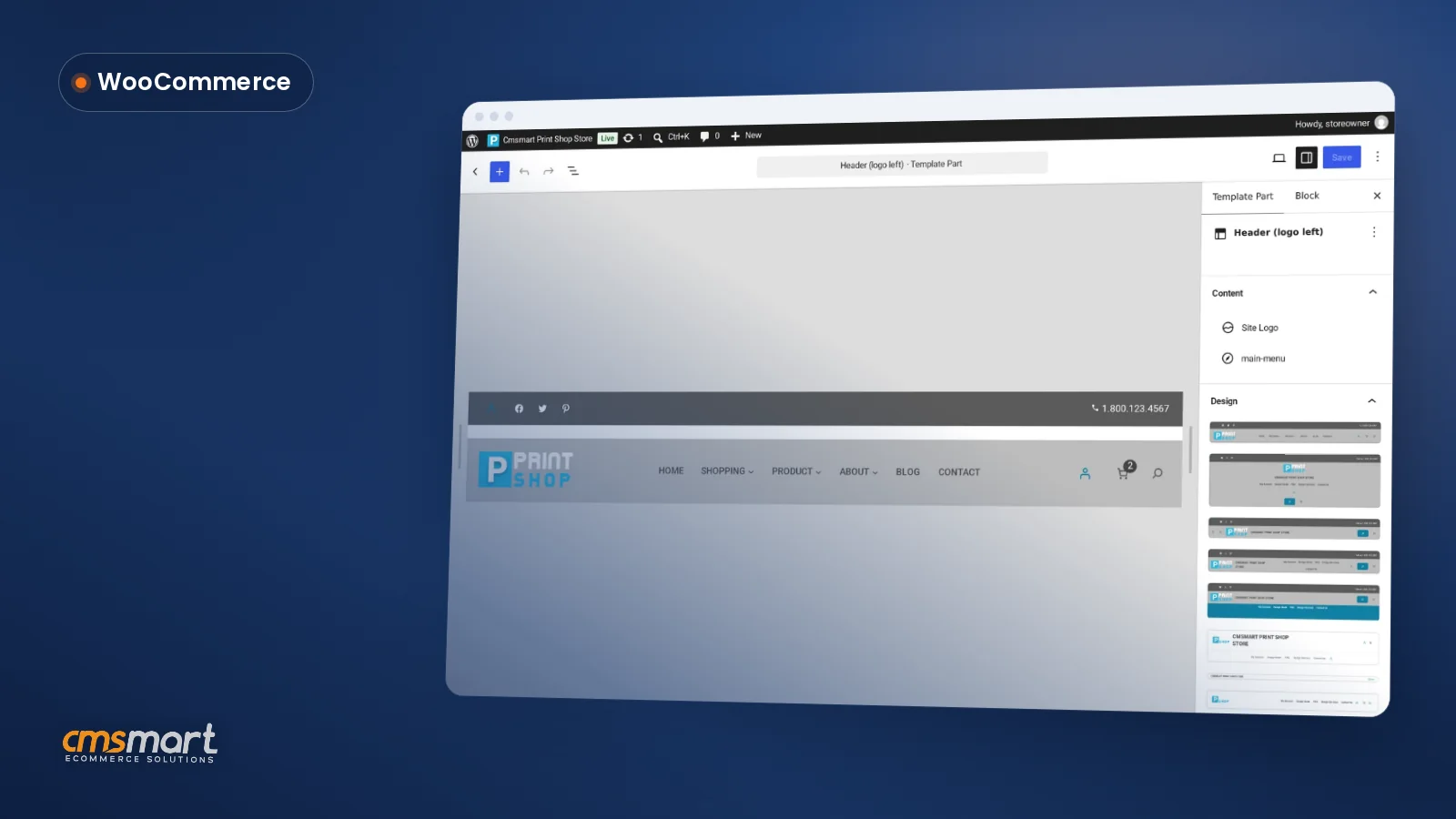
Three short guides with real screenshots take you from download to a branded store.
Customize WooCommerce block theme settings on your Cmsmart Store: colors, fonts, header and footer in the Site Editor, no code needed. See h...
Features
Everything a business buyer does, in order
From the first application to the brand template on the print file, grouped the way your buyers meet them.
Product screenshot, fictional demo data
Apply and join
Business registrationA form with company data, tax ID and an optional document. Format check per country and a live EU VIES check.
Approval of new buyersApplications wait in your Inbox. Approve in one drawer that sets the price list, payment terms, credit limit and seats, ask for more information, or reject; approval creates the company and makes the applicant its admin.
Company accounts and rolesAdmin, buyer, approver, designer and viewer, a seat limit and single-use invitations.
Product screenshot, fictional demo data
Find and price
Catalogue filters and SKU searchFilter by category, product type, attributes and stock; signed-in members also filter by their own price, what they ordered before and their lists. Search finds a product by name or SKU as you type. Guests see no prices and no price filter.
Login-only catalogueOpen, hide prices for guests, or login required; members can be limited to approved products.
Price lists, tiers and contract pricesBy company or tier, with quantity breaks, promo codes, validity dates and CSV import and export.
Min, max and pack quantitiesPer product, variation, category, company or price list, enforced everywhere a quantity enters a cart.
Product screenshot, fictional demo data
Order
Order pad and quick orderSwitch the catalogue to a list and add many SKUs to the cart in one go, or type, paste or upload them in Quick order; a CSV file gets a line-by-line report before anything reaches the cart.
Buy again, order again and saved listsEverything the company ordered before, with the last price next to today's, back in the cart in one step. Order again brings back the design, print options and files of a past order; saved lists keep what the team orders again, shared with colleagues to view or edit, and members who cannot order send a list for approval.
Request a quote with filesFrom the product page, the cart or one quote form, with artwork attached. New visitors can ask too when you allow it: the request reaches you once they confirm their e-mail address.
B2B quotesLocked unit prices, a valid-until date, counter-offers with every version kept, accepted into an order.
Product screenshot, fictional demo data
Approve and control
Order approvalsRules by limit or always; approvers decide on orders, quotes and lists sent for approval in one queue, or open the order straight from the approval e-mail with Review order (they still sign in), and the company admin approves new brand templates.
BudgetsPer company, member or cost centre, per month, quarter or year: block, require approval or warn.
Payment rules per groupAllowed payment methods and a minimum order total per method, per company or price list.
Company activity and buyer reportsOne timeline of the company's orders, quotes, approvals, payments and team changes, and spend by month, member, cost centre and top products, with CSV download.
Product screenshot, fictional demo data
Pay and ship
PO and net termsPurchase order / Net terms at checkout, net days, a credit limit and a ledger; invoices paid online are booked by themselves, and you record payments made another way.
Pay several invoices onlineCompany admins, approvers and billing members pick open invoices and pay them in one payment by card or PayPal through your store's own gateways, with monthly statements as PDF or CSV and reminders before and after the due date.
Tax-exempt companiesThe company uploads its tax certificate; once you approve it with an expiry date, its orders are tax-free until that date.
Shipping locationsOffices, branches and event venues with recipients; members choose one at checkout.
Product screenshot, fictional demo data
Brand and design
Brand assetsA private library per company with folders, a storage quota and authenticated downloads.
Brand templatesBrand library, brand rules and company-private brand templates, built on Cmsmart Product Designer: locked layers, and approval by the company admin before use.
Brand rulesAllowed fonts, brand colours, clipart categories and templates that must keep the logo.
Buyer Account tour
What your client's team sees in My Account
The Buyer Account is an app inside WooCommerce My Account. Each member sees the pages their role allows.
Product screenshot, fictional demo data
Overview
Company card, price list, open quotes, approvals waiting and available credit.
Product screenshot, fictional demo data
Orders
Admins and approvers see the company's orders with member, PO and location, filters and CSV export.
Product screenshot, fictional demo data
Quotes
Ask for a quote with artwork files, then accept, decline or request changes; every version is kept.
Product screenshot, fictional demo data
Approved products
Products the team may order, with locked print options and a team price.
Product screenshot, fictional demo data
Shipping locations
Offices and venues, with a default and recipients.
Admin tour
What you manage in wp-admin
One Cmsmart B2B menu for you and your shop managers. Company admins run their own team from the account.
Inbox
Applications, orders waiting for approval, quotes to answer, overdue payments and tax certificates in one place, with filters, bulk approve and internal notes. Review company data, the tax-ID result and documents, then approve in one drawer with the price list, terms, credit limit, approval rule and seats.
Companies
Status, tier, price list, seat limit, payment terms, members and tier history; suspending removes B2B rights at once.
Price lists
Rules by everything, category, product or variation, with CSV import (dry-run preview, one transaction, import log) and export, and Preview as company to check what a client pays.
Quantity rules
Overrides per company or price list and a minimum order value per company.
B2B quotes
Build a quote for a company with locked prices, email it and keep every version.
Credit and terms
Credit ledger, record payment, overdue flags, invoices paid online booked once, and reminders before and after the due date to the members who pay invoices.
Payment rules
Whitelist payment methods and set a minimum total per method, per company or price list.
Store reports
A Reports view next to the Overview: sales by company, quote win rate, average approval time and overdue invoices by age, each with a CSV download.
REST API and webhooks
Connect your ERP, CRM or accounting tool to companies, members, price lists, quotes, applications and invoices with WooCommerce REST API keys; webhooks fire when a company is approved, a quote is accepted, an order is approved or an invoice is overdue.
Brand library and rules
Assign templates, set storage quotas and fonts, colours and clipart per company; lock the rules if you want.
Who it is for
Print shops, agencies and corporate merch
The same company layer, set up for different businesses and buyers.
For print shops
Give trade and corporate clients a login with their own prices, repeat orders with the same design and files, and invoices on terms.
The price and billing options below are read from the pricing page, where every plan is compared.
Cmsmart B2B
Sell to business buyers with a private ordering portal
$149/mobilled yearly $1,490
Billed annually: $1,490/year — 2 months free, you save $298.
Everything in Fullstore + the Cmsmart B2B plugin
A full B2B store solution: quotes, reorders, company accounts
Cmsmart B2B plugin + Cmsmart B2B Store in one package, activated with your key
Tickets in your dashboard
First reply within 24 h (48 h at weekends)
Free 3-month hosting helps you launch fast if you don't have a host ready yet. You can also install the store on your own hosting — the free hosting is optional.
Cmsmart B2B Store: free download in your dashboard, install it with your licence key (a trial key works during the trial).
I’ve purchased a few themes from Cmsmart now, the themes themselves are incredibly well made but the support service is outstanding!!
Requests are handled promptly and the team are always friendly, highly recommended.
Straight answers about Cmsmart B2B, checked against its user guide.
What is Cmsmart B2B?
A plan sold as a full store solution: the Cmsmart B2B plugin with the company layer and the Cmsmart B2B Store, plus the rights of Cmsmart Fullstore and Cmsmart Premium. The Cmsmart B2B plugin and the Cmsmart B2B Store come in one package in your dashboard — no separate purchase, activated with your plan key. A trial key works during the trial. It needs WooCommerce 8.0 or newer and Cmsmart Product Designer 2.18 or newer.
I already have my own store. Can I upgrade it to B2B?
Yes. You buy the Cmsmart B2B licence, then our team surveys and analyses your current store and sends you a separate proposal and quote for the upgrade work.
What happens if my plan lapses?
Your store keeps running. Existing companies, price lists, terms, credit and quotes are honoured at checkout and checkout never blocks a sale. Configuration screens are locked until the plan is active again.
Can I use my own theme instead of the Cmsmart B2B Store?
Yes. The Buyer Account lives in WooCommerce My Account and takes its colours from your theme. The Cmsmart B2B Store is a ready-made storefront if you want one.
What is not included?
A ready-made ERP or CRM sync, punch-out ordering, users in several companies and scheduled reorders are not part of Cmsmart B2B. Your developer can connect an ERP or CRM through the included REST API and webhooks, or we build these as custom development on your store.
Where do I see the price?
On the pricing page, which is the only place plan prices are set. The Cmsmart B2B plan is billed annually, shown as a price per month, and includes AI tokens.
How do I pay securely?
Contracts and payments go to the company, Netbase JSC: plans are paid through PayPal; services are invoiced by Netbase JSC under a written proposal and paid by bank transfer to Netbase JSC's company account or by PayPal Business. Cmsmart (Cmsmart Ecommerce) is the ecommerce brand of Netbase JSC, a company based in Hanoi, Vietnam.
How do I contact Cmsmart or get a quote?
Message the Cmsmart team on WhatsApp at +84 937 869 689 or email project@cmsmart.net; the contact page at cmsmart.net/contact lists every channel, and Request a quote (cmsmart.net/project-proposal) sends a project brief. Customers with a licence open a ticket from the dashboard.










 Ari van Esch

 Verified on Trustpilot
 Mark Hullin
 BigJayce





