Part of Cmsmart Ecommerce. PDF, PNG, SVG and JPG CMYK output.
When a buyer finishes a design and clicks Process, Cmsmart queues a print-ready PDF for that order item, checks that the file really exists before marking it ready, retries a failed render and alerts your team if it still fails. The file can travel with the order email, and the order screen shows its status.
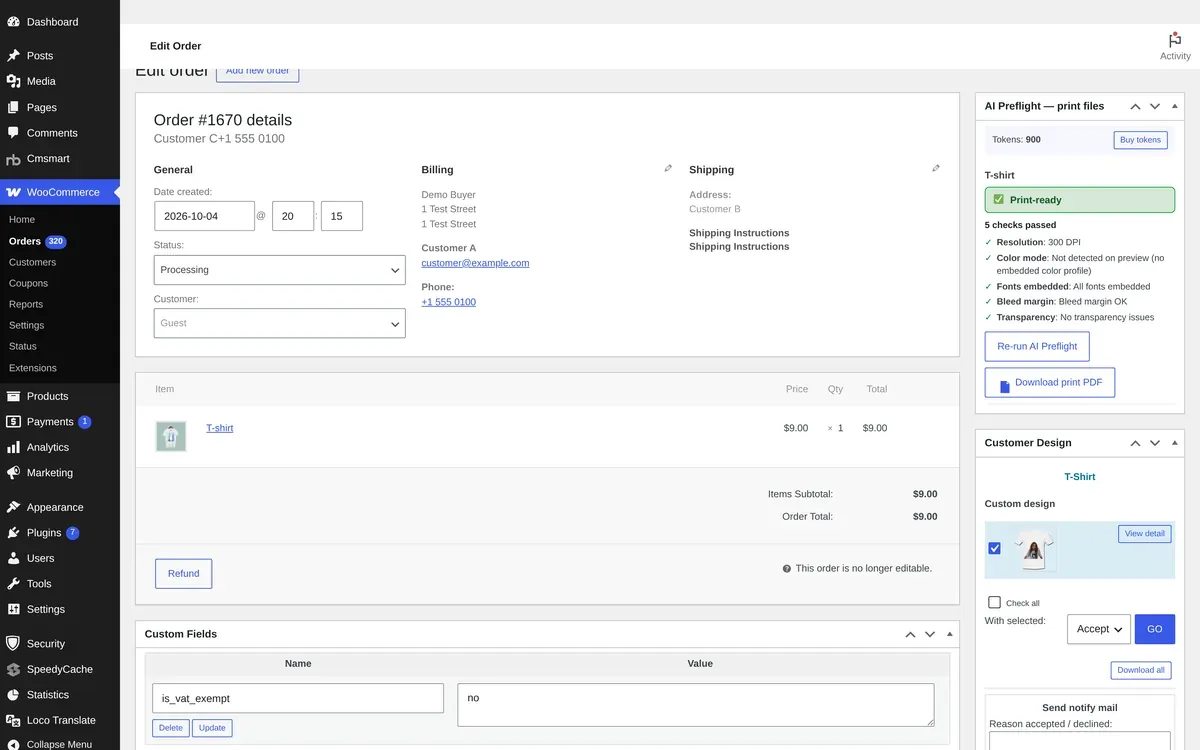
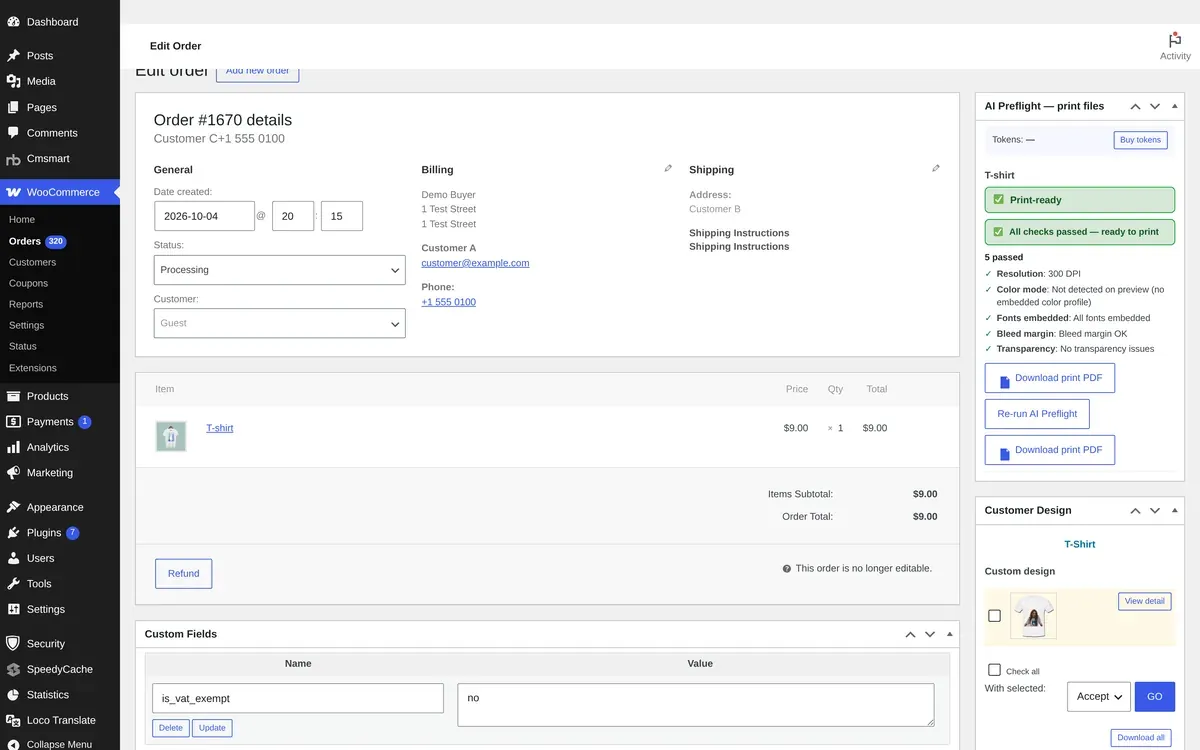
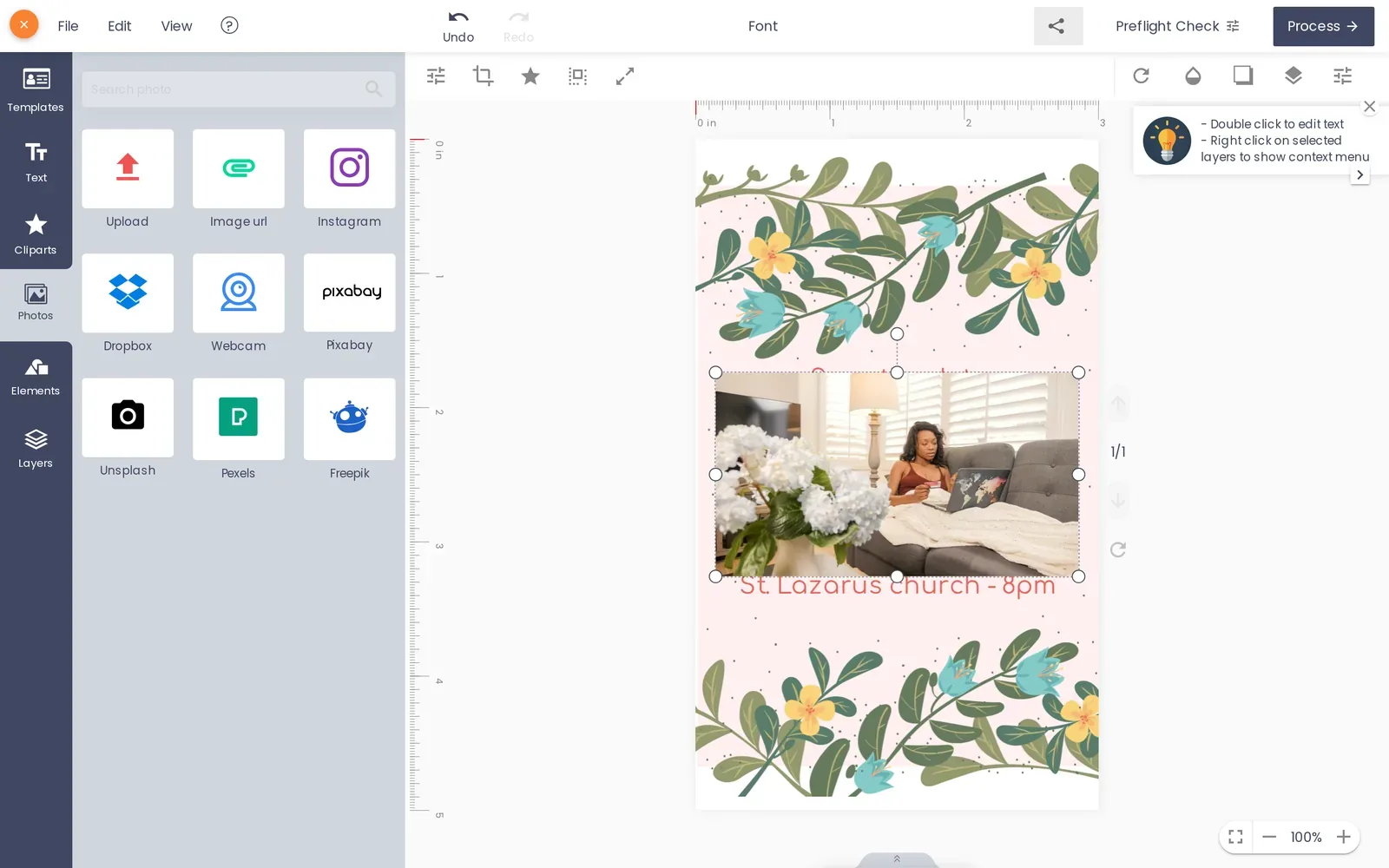
Real capture, demo data: an order with its print-ready file and preflight result.
In short
What Print-Ready Files does for your store
Rendered when the buyer clicks Process, checked before it is marked ready, retried on failure and attached to the order email.
Starts
When the buyer clicks Process
Formats
PDF, plus PNG, SVG and JPG CMYK
Status
Ready, Rendering, Failed, Regenerate
Checked against
Plugin 2.17.1 source
The problem
Why rebuilding print files costs a print shop every day
A design that looks right in the browser still has to become a file the press accepts: the ordered size, bleed, fonts and colour. When that file is rebuilt by hand, every order waits for prepress.
Prepress rebuilds or exports files order by order before anything can print.
An order ships late, or without its artwork, because nobody noticed the file was missing.
Custom-size orders print at the template size because the file and the order do not match.
Cost of the status quo, with your own numbers: prepress hours per order x orders per month x hourly cost.
What it does
What your team sees on the order
Real captures of the plugin in wp-admin on our demo store, with demo data.
A file you can trust
The order panel lists the print file with its checks and Download print PDF; AI Print Preflight can check it before production.
Every output format
Download design offers SVG, PNG, JPG CMYK with an ICC profile and PDF for each design.
File status on the order
The buyer sees the design on the order with its proof and print-file status while the PDF renders.
Verified capabilities
Checked against the plugin source (version 2.18.5) and its changelog. Anything else is listed under custom development.
Rendered on Process
With Auto export design to PDF on, clicking Process queues a background render; checkout never waits for it (2.16.0).
Checked before ready
A render is recorded as ready only when real, non-empty PDF files exist for the design (2.16.0).
Retries and one alert
A failed render is retried after 1 and 5 minutes, then marked Failed, and your recipients get one alert naming the order and the design (2.16.0).
PDF in the order email
A Print-ready PDF file type can be attached to the new-order notification; if it is still rendering, a second email delivers it (2.16.0).
Matches the ordered size
Automatic PDFs use the same page geometry as Create PDF, including the buyer's custom width and height (2.17.0).
Status and Regenerate
The order artwork screen shows Ready, Rendering, Failed or Not rendered, with a Regenerate print-ready PDF button (2.17.0).
Bleed, ICC and outlines
Output settings include bleed display, a default ICC profile for JPG CMYK and fonts converted to outlines in SVG (beta).
Fresh file on reorder and edits
A reorder or an edit after ordering queues a new print file instead of reusing the old one (2.17.0).
How it works
How it works
1
Buyer clicks Process
The design is saved and a background render is queued.
2
Render is checked
Only real, non-empty PDF files are certified as ready.
3
PDF on the order
The certified PDF can be attached to the new-order email.
4
Download or regenerate
Download every format, or regenerate the print-ready PDF.
Use cases
Who uses Print-Ready Files
The same module, set up for different products and buyers.
Business cards and stationery
Every card order arrives with its PDF, so prepress checks instead of rebuilding.
Large format and signage
Custom-size banners render at the size the buyer ordered.
Labels and packaging
Files with bleed reach the press without a manual export step.
B2B print buyers
Repeat orders get a fresh, checked file every time.
Feature table
Print-Ready Files at a glance
Every option, rule and output in one place.
Trigger
Process in the designer; the order status you choose re-checks every design
Great software and excellent support!
NBDesigner is a fantastic tool – very intuitive and easy to use. It makes the customization process smooth and efficient. The support team is also incredibly helpful, responsive, and professional. I use it on my website, and it works perfectly. Highly recommended!
Selena the best Customer service provider, she give us Discount for long period of time subscription, helping us in every problem, we had some bugs, he fixed for us too! Great Plugin and very smart managers/devs/support
Print-Ready Files ships inside Cmsmart Product Designer for WooCommerce. One licence covers every module, and they work together on the same product page.
Straight answers about Print-Ready Files, checked against the plugin.
Does Cmsmart Product Designer create print-ready PDFs automatically?
Yes. With Auto export design to PDF on, the PDF render starts when the buyer clicks Process, and the order status you choose re-checks every design.
What happens if a PDF fails to render?
The render is retried after 1 and 5 minutes. If it still fails it is marked Failed and one alert names the order, the design and the reason.
Can the print file be attached to the order email?
Yes. Add the Print-ready PDF file type in the plugin settings; only a PDF certified for the current design is attached, and a second email follows if it was still rendering.
Does the PDF match a custom size the buyer entered?
Yes. Since 2.17.0 the automatic render uses the same page geometry as Create PDF, including custom width and height.
Which other formats can my team download?
PNG, SVG and JPG CMYK with an ICC profile, plus any files the customer uploaded.
Can files go straight to our press?
That is custom development: hot folders, MIS or RIP connections are scoped and quoted per project.
How do I pay securely?
Contracts and payments go to the company, Netbase JSC: plans are paid through PayPal; services are invoiced by Netbase JSC under a written proposal and paid by bank transfer to Netbase JSC's company account or by PayPal Business. Cmsmart (Cmsmart Ecommerce) is the ecommerce brand of Netbase JSC, a company based in Hanoi, Vietnam.
How do I contact Cmsmart or get a quote?
Message the Cmsmart team on WhatsApp at +84 937 869 689 or email project@cmsmart.net; the contact page at cmsmart.net/contact lists every channel, and Request a quote (cmsmart.net/project-proposal) sends a project brief. Customers with a licence open a ticket from the dashboard.




 Account Manager
 Project Manager
 Business Analyst
 Developers & QA


 วชิระ เชื้อผู้ดี

 Verified on Trustpilot
 Khanh Nguyễn Đức
 Deverloop - Digital Studio