Web-to-print design templates that get customers designing in seconds
Cmsmart design templates give buyers a ready design instead of a blank canvas: templates you add per product or pick from the global template store, template fields that insert the buyer's name, title and phone, and locked layers that keep brand artwork intact. A clipart library of 25,918 items in 69 categories is included.

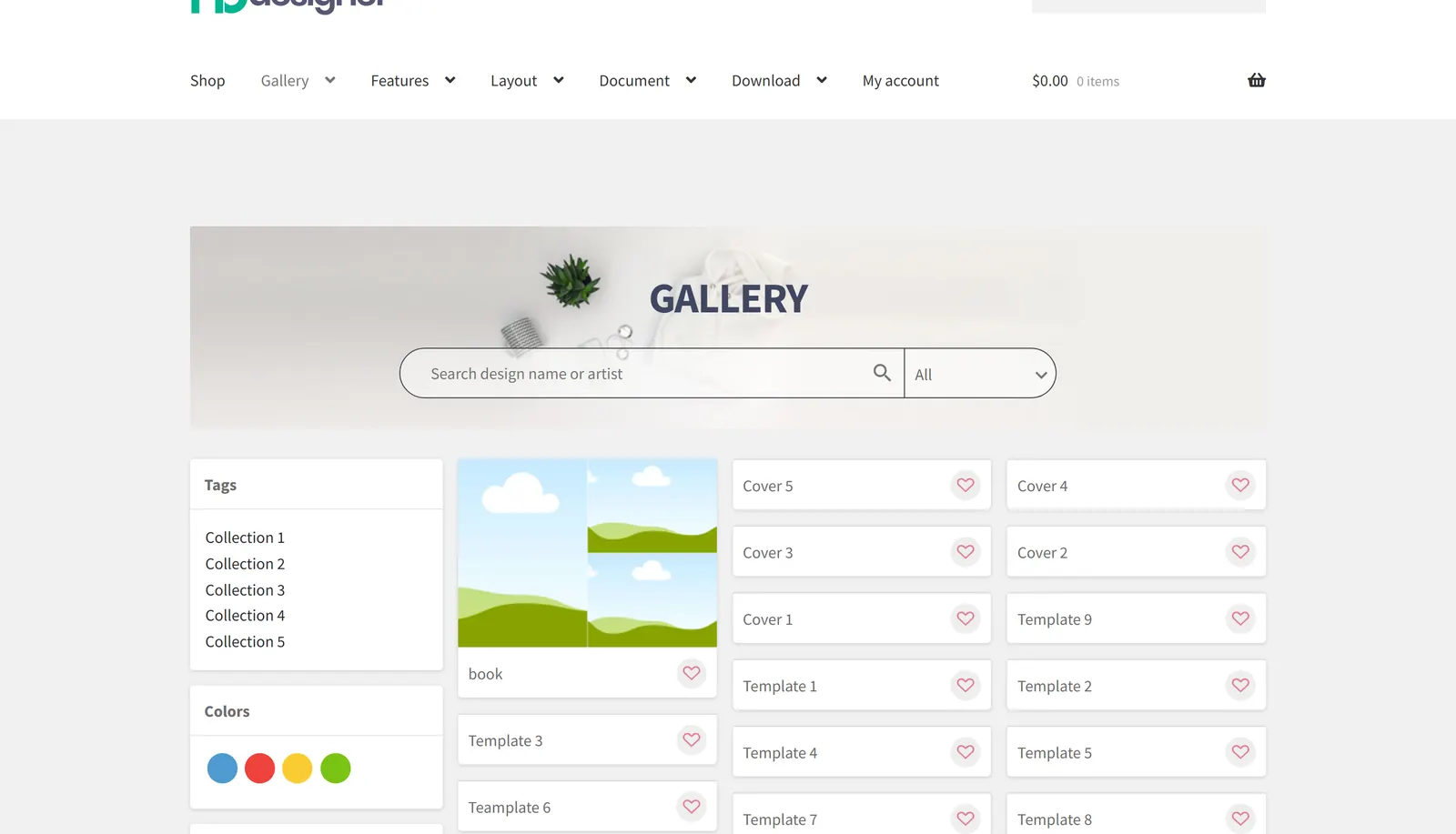
Real capture, demo store: the template gallery.
In short
What Templates Library does for your store
Templates per product, a global template store, fields that fill in the buyer's details and 25,918 cliparts in 69 categories.
- Sources
- Your templates, global template store
- Library
- 25,918 cliparts in 69 categories
- Brand control
- Locked layers, template fields
- Checked against
- Plugin 2.17.1 source
The problem
Why a blank canvas loses orders
Most buyers are not designers. Faced with an empty business card they hesitate, leave, or send a request for your team to design it.
- Buyers abandon the designer when they have to start from nothing.
- B2B brand artwork drifts because every employee designs their own card.
- Your designers spend hours on simple orders that a template would cover.
- Cost of the status quo, with your own numbers: abandoned designer sessions x average order value.
What it does
Templates in the designer
Real captures of the plugin on our demo store.
-

Templates inside the editor
Searchable templates for the product, applied to the print area in one click.
-

Clipart library
Categories and search over the shared clipart library.
-

Public template gallery
Buyers browse designs by tag and colour before they open the editor.
Verified capabilities
Checked against the plugin source (version 2.17.2) and its changelog. Anything else is listed under custom development.
Templates per product
Add ready designs to each product so buyers start from a layout.
Global template store
Pick templates from the global store for your products.
Template fields
Map fields such as name, title and phone so buyer details fill the design.
Locked layers
Prevent deleting template layers or adding more, to keep brand artwork intact.
Auto-filled photo placeholders
Photo placeholders in a template fill with the buyer's photo.
25,918 cliparts
A shared clipart library in 69 categories (2.14.0).
Public template gallery
A gallery page with tags, colours and search across published designs.
How it works
How it works
-

Browse the gallery
Pick a design by product, tag or colour.
-

Open it in the editor
The template fills the print area of the product.
-

Make it yours
Change text and photos; locked layers stay as they are.
-

Add artwork
Cliparts, shapes and photos from the libraries.
Use cases
Who uses Templates Library
The same module, set up for different products and buyers.
-
Business cards and stationery
Ready layouts that buyers personalise in minutes.
-
B2B brand stores
Locked brand templates with each employee's details filled in.
-
Apparel and merchandise
Seasonal designs and cliparts for shirts, mugs and bags.
-
Events and signage
Banner and poster templates for recurring events.
Feature table
Templates Library at a glance
Every option, rule and output in one place.
| Template sources | Templates per product, global template store |
|---|---|
| Buyer details | Template fields mapped to name, title, phone and more |
| Brand control | Prevent delete template layers, prevent add more layers |
| Photos | Auto-fill template photo placeholders |
| Clipart | 25,918 cliparts in 69 categories (2.14.0), move between categories |
| Gallery | Public template gallery with tags, colours and search |
Proof
Shipping today, and you can try it live
Everything on this page runs on our public demo store. Open it, change the options and watch it work before you install anything.
- Current release Plugin 2.18.1 Read the release notes →
- Live demo store nbdesigner.cmsmart.net Open Templates Library on the demo →
- Demo library Videos and click-through demos Browse the demos →
- Customer reviews of the plugin 4.9 out of 5 from 223 customer reviews Reviews written by customers on cmsmart.net Read the 223 reviews →
The team behind it
A dedicated team runs your project
Account Manager
Project Manager
Business Analyst
Developers & QA
- Scoped first by an Account Manager and a BA
- Milestones and sprints tracked in WorkSuite
- Support and growth after launch
Real numbers, real clients
Trusted by store owners in 80+ countries
What we have delivered since 2012, and what customers say about working with us.
- 6,300+ client projects since 2012
- 4,600+ projects delivered since 2012
- 1,800+ live stores online now
- 80+ countries clients worldwide
- 500+ custom development projects since 2012
- 120+ engagements running 5+ years ongoing support
Since 2012 · a Netbase JSC company · as of Sep 2026 · source: WorkSuite project records
Rated by customers on third-party sites (as of Sep 2026)
Teams in 80+ countries run their ecommerce projects with Cmsmart
Good Services. Provide the professional advice to improve and modify the CMS system.
HK TP
Andrea and Katie were very helpful in setting up my website, installing plugins and guiding in setting up products. Great customer service ๐
Digitees AU
Andrea and Katie were very helpful in setting up my website, installing plugins and guiding in setting up products. Great customer service ๐
Digitees AU
Read more testimonials Delivered & maintained with WorkSuite: tickets, tasks, milestones and invoices in one place. See how it works
Setup
How to set up templates
Five steps in wp-admin, no code.
- Open a product with the designer enabled and create templates for it.
- Optionally pick templates from the global template store.
- Set template fields so buyer details fill in automatically.
- Lock template layers where brand artwork must not change.
- Publish and open the product to check the template list.
Custom development
Need logic the plugin does not have?
We extend Templates Library for your business as a scoped project, built on your WooCommerce store and tracked in WorkSuite like every client project.
- Brand template portals per company account
- Variable data printing from a CSV (badges, certificates)
- Bulk template creation from your existing artwork
- Template approval before publishing
One plugin, several modules
Part of Cmsmart Product Designer for WooCommerce
Templates Library ships inside Cmsmart Product Designer for WooCommerce. One licence covers every module, and they work together on the same product page.
-
Module Pricing Options Option fields with live prices: price matrix, quantity breaks, area and turnaround pricing. See Pricing Options →
-
Module Order Upload Customers upload print-ready artwork on the product page, with file rules, previews and re-upload. See Order Upload →
-
Module Online Designer A product design editor with templates, text, cliparts, photos, layers and print-ready output. See Online Designer →
-
Module Print-Ready Files A print-ready PDF for every designed order item, checked, retried and attached to the order email. See Print-Ready Files →
-
Module Artwork Approval Accept or decline each customer design on the order, email the reason and lock approved artwork. See Artwork Approval →
-
Module Product Builder Configure products from components (frame, colour, parts) with a live total, without a SKU per combination. See Product Builder →
-
Module Templates Library Ready designs per product, a global template store, template fields and 25,918 cliparts. You are here
-
Module Sample Data Import Import 23 ready-made sample products with designer settings, templates and print options, then make them your own. See Sample Data Import →
FAQ
Frequently asked questions
Straight answers about Templates Library, checked against the plugin.
Does Cmsmart Product Designer include design templates?
Yes. You add templates per product and can pick from the global template store; buyers start from a ready layout.
Can templates fill in the buyer's details?
Yes. Template fields map details such as name, title and phone into the design.
Can I stop buyers changing my brand artwork?
Yes. Template layers can be protected from deletion and from adding more layers.
How many cliparts are included?
25,918 cliparts in 69 categories, from the shared library (2.14.0).
Is there a public template gallery?
Yes, buyers can browse designs by tag, colour and search before they open the editor.
Can you create templates for our products?
Yes, template creation and brand portals are custom work, scoped and quoted per project.
How do I pay securely?
Contracts and payments go to the company, Netbase JSC: plans are paid through PayPal; services are invoiced by Netbase JSC under a written proposal and paid by bank transfer to Netbase JSC's company account or by PayPal Business. Cmsmart (Cmsmart Ecommerce) is the ecommerce brand of Netbase JSC, a company based in Hanoi, Vietnam.
How do I contact Cmsmart or get a quote?
Message the Cmsmart team on WhatsApp at +84 937 869 689 or email project@cmsmart.net; the contact page at cmsmart.net/contact lists every channel, and Request a quote (cmsmart.net/project-proposal) sends a project brief. Customers with a licence open a ticket from the dashboard.

Get started
Put Templates Library to work in your store
Start with a free 30-day trial licence of the plugin, or tell us what your products need.
Top