Cmsmart AI products

AI credits: one balance for every tool and every store

Part of Cmsmart AI.

One balance for every AI tool and every store you run.

Tokens are what the Cmsmart AI tools spend when they work on your customers' artwork. One wallet covers every tool; you see balance, plan and usage in your dashboard and in WordPress admin.

Shipping Since version 2.12 Release note

Cmsmart Cloud Billing: the four monthly token plans Starter, Pro, Best value, Business and Partner with tokens per month, and token usage by day
Real screen from plugin 2.17.0 or the Cmsmart dashboard; demo data only.
Since
Plugin 2.12
Runs in
Your Cmsmart dashboard
Billing
Monthly token plan with optional top-ups
Checked against
Plugin 2.17.0

Problem and outcome

AI costs that nobody can see are AI costs that grow

The problem

When every AI tool bills separately, the real cost of AI in your store is a spreadsheet exercise, and a surprise at month end.

  • Separate balances per tool or store make it hard to know what is left.
  • A run that fails halfway should not cost twice.
  • Customers should never be the ones who find out the balance is empty.
Usage and Tokens in the Cmsmart dashboard: current balance and plan

What good looks like

Example scenario: on the first of the month your plan renews and the wallet shows the plan's allowance. During the month you watch usage by day in the dashboard, and if you need more you top up without leaving WordPress.

How it works

How the token wallet works

  1. Billing in Cmsmart Cloud with the current token balance and monthly plans
    Step 1

    Open Usage and Tokens

    Sign in to your Cmsmart dashboard and open AI & Cloud, then Usage & Tokens (or the Billing tab in Cmsmart Cloud in WordPress).

  2. Monthly token plans billed through PayPal
    Step 2

    Subscribe to a plan

    Subscribe to a monthly plan; it is billed through PayPal and renews until cancelled.

  3. Token usage by day across all AI tools
    Step 3

    Spend from one balance

    Each AI operation spends tokens from the one shared balance; usage by day is listed.

  4. Current balance and plan in Cmsmart Cloud
    Step 4

    Renewal resets the allowance

    Each renewal replaces the balance with the plan's allowance; unused tokens, including mid-cycle top-ups, do not carry over.

Key features

Only what ships in the plugin or dashboard today, checked against the changelog.

  • One wallet for the whole account in the Cmsmart plugin or dashboard (real capture, demo data)

    One wallet for the whole account

    Shared by every AI tool and every one of your stores, keyed to your Cmsmart account.

  • Monthly plans in the Cmsmart plugin or dashboard (real capture, demo data)

    Monthly plans

    Starter, Pro, Business and Partner plans with a monthly token allowance, billed through PayPal and renewing until cancelled.

  • Usage by day in the Cmsmart plugin or dashboard (real capture, demo data)

    Usage by day

    Total tokens used per day across all AI tools, in the dashboard and in the plugin's Billing tab.

  • Subscription management in the Cmsmart plugin or dashboard (real capture, demo data)

    Subscription management

    Subscription status, plan options, token usage and current plan are managed from the wallet (2.12).

  • Top-ups for subscribers in the Cmsmart plugin or dashboard (real capture, demo data)

    Top-ups for subscribers

    A one-time token top-up is available while a monthly subscription is active.

  • Low-balance handling in the Cmsmart plugin or dashboard (real capture, demo data)

    Low-balance handling

    One email when the balance runs out and at most one digest a day; customers see the assistant resting, never a balance.

  • Never charged twice for the same check in the Cmsmart plugin or dashboard (real capture, demo data)

    Never charged twice for the same check

    Re-running an unchanged preflight is recognised as the same operation (2.14.1).

Monthly token plans

Billed through PayPal and renewed until cancelled. Each renewal replaces the balance with the plan's allowance.

  • Starter

    $29 per month

    3,000 tokens per month

    $0.0097 per token

  • Best value

    Pro

    $99 per month

    20,000 tokens per month

    $0.005 per token

  • Business

    $299 per month

    100,000 tokens per month

    $0.003 per token

  • Partner

    $999 per month

    500,000 tokens per month

    $0.002 per token

Prices as shown in the plugin under Cmsmart Cloud, Billing on 4 October 2026. Plans can change, so the live plans in your dashboard always apply.

  • Billing tab: current balance, monthly plans and token usage by day

    Balance, plans and usage by day

    The balance, the monthly plans billed through PayPal, and tokens used per day.

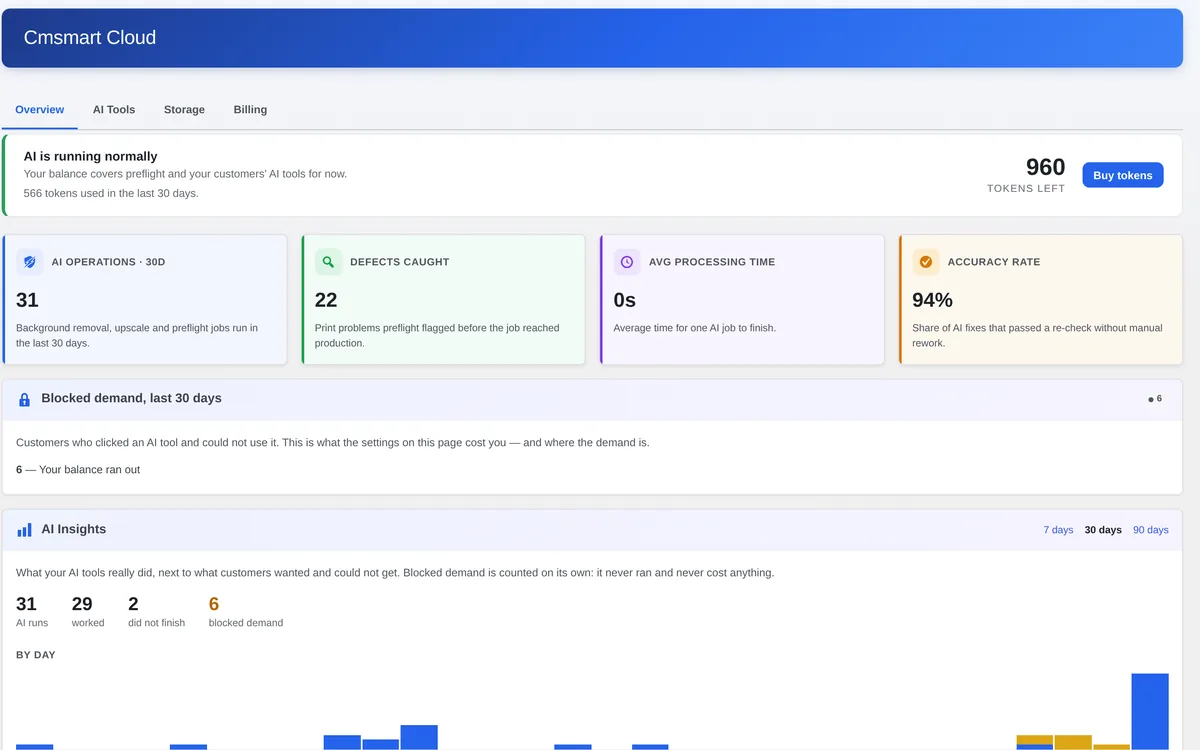
  • Cmsmart Cloud Overview with tokens left, AI operations and blocked demand

    Overview

    Tokens left with a Buy tokens button, and what the tools did in the last 30 days.

  • Usage and Tokens in the Cmsmart dashboard: current token balance and plan

    In your Cmsmart dashboard

    The same wallet under AI & Cloud, Usage & Tokens.

Business value and who it is for

Measure it with your own numbers: the KPI column says what to track.

BenefitHow it shows up in your businessKPI to track
Predictable costA monthly plan allowance instead of open-ended per-call billing.Tokens used vs plan allowance
No surprise at month endUsage by day and a low-balance email.Days with balance at zero
Cheaper tokens at volumeThe price per token falls on larger plans (see the table).Effective price per token
  • Store owners

    One number to watch and one place to top up.

  • Agencies

    A single wallet across the stores they manage for clients.

  • Finance teams

    Predictable monthly plans and a usage ledger instead of per-call surprises.

Changelog

What changed for this product, newest first. The full plugin history is in the release notes.

  1. 2.15.0

    Added

    • Top up without leaving wp-admin: Buy tokens opens the purchase flow in a dialog.
    • Out-of-token events are recorded in full in the AI usage log.
  2. 2.14.0

    Added

    • The Cmsmart Cloud section carries the AI Tools, Token Wallet and Cloud Storage tabs.
  3. 2.12.0

    Added

    • Subscription management in the AI wallet: status, monthly plan options, token usage and current plan.
  4. 2.11.0

    Added

    • Tokens are managed in one shared Cmsmart wallet; the plugin reads its balance, packages and transactions.

Before you start

Limits to know and what you need

Limits to know

  • Each plan renewal replaces the balance with the plan's allowance; unused tokens, including mid-cycle top-ups, do not carry over.
  • The balance is shared by all AI tools on your account.
  • Plans and prices can change; the live plans are always the ones shown in your dashboard.
What you need panel in the plugin: an active licence for this domain and tokens in your balance

What you need

  • An active Cmsmart licence on the store's domain
  • The Cmsmart Ecommerce plugin 2.12 or later
  • AI tokens in your Cmsmart wallet

Get a free trial licence →

Real numbers, real clients

Trusted by store owners in 80+ countries

What we have delivered since 2012, and what customers say about working with us.

  • 6,300+ client projects since 2012
  • 4,600+ projects delivered since 2012
  • 1,800+ live stores online now
  • 80+ countries clients worldwide
  • 500+ custom development projects since 2012
  • 120+ engagements running 5+ years ongoing support

Since 2012 · a Netbase JSC company · as of Sep 2026 · source: WorkSuite project records

Teams in 80+ countries run their ecommerce projects with Cmsmart

Excellent service for the right price! - Fast support by chat / video! Happy to work with people like Chuong, always ready to fix all needs. Hope to work for many years with them.

Sven v B Sven v B Netherlands Jan 2021
Verified on Trustpilot

The website is very well made. However, I would like to point out the quick response of the staff, especially Ms. Andrea, who solved all our problems very quickly and kindly. Thanks.

Juš Jordan Kondić Juš Jordan Kondić Slovenia Jan 2021
Verified on Trustpilot

NBDesigner is a very robust plugin for printing shops. It may take a bit of time to learn, as I am, but the support team is there to help. I've been in printing 30 years and I am impressed with how the developers have thought this plugin through. It has everything.

Pamela Redman Pamela Redman United States Dec 2020
Verified on Trustpilot

Read more testimonials Delivered & maintained with WorkSuite: tickets, tasks, milestones and invoices in one place. See how it works

Frequently asked questions

Is there one balance per store?

No. One Cmsmart wallet is shared by every AI tool on your account.

Do unused tokens roll over?

No. Each renewal replaces the balance with your plan's allowance, so unused tokens and mid-cycle top-ups do not carry over.

What do the plans cost?

As shown in the plugin's Billing tab on 4 October 2026: Starter $29 per month for 3,000 tokens, Pro $99 for 20,000, Business $299 for 100,000 and Partner $999 for 500,000. Plans may change; the live plans are always in your dashboard.

Where do I top up?

In your Cmsmart dashboard under AI & Cloud, Usage & Tokens, or from the Buy tokens button in WordPress admin. Top-ups need an active monthly subscription.

Need AI built around your own workflow?

The tools above are packaged and shipping. Connecting AI to your catalogue, support desk, ERP or print specification is custom development: we scope it with you, build it on your WooCommerce store and track it in WorkSuite like every client project.

More Cmsmart AI products

Put Cmsmart AI Token Wallet to work in your store

Available to Cmsmart Ecommerce plugin users with an active licence. Start with a free trial licence, or tell us what you want AI to do in your store.

Elevate your store with Cmsmart

Enhance your eCommerce with our powerful plugins and explore fully built demo stores to see them in action.


Top