
Guide · Web-to-print
WooCommerce Customer CRM Print Shop Guide (NBDesigner)
A WooCommerce customer CRM print shop teams already run: segments, tags and a care digest built in. See how to set it up.
A print shop can run web to print three ways: open source code you assemble yourself, a hosted SaaS you rent, or licensed software you host and own. Open source vs SaaS web to print software is not really a feature fight — it is a decision about who owns your store, what you pay every year, and how easily you can leave. Cmsmart is the third model: WooCommerce on your own hosting, licensed per plan.
Was this tutorial helpful?
Written by the Founder & CEO
Huy Nguyen (David), Founder & CEO
Huy Nguyen (David) is the Founder & CEO of Cmsmart Ecommerce, a division of Netbase since 2012. His focus is strategic planning and customer success: helping online stores choose the right platform, tools and AI approach for their business. He writes the Cmsmart strategy, AI, business and comparison guides and is happy to talk directly with store owners.
For support and project requests, please open a ticket in your dashboard — the official channel.
More from David →The team behind it
 Account Manager
 Project Manager
 Business Analyst
 Developers & QA
Guide · Web-to-print
A WooCommerce customer CRM print shop teams already run: segments, tags and a care digest built in. See how to set it up.
Guide · Web-to-print
A WooCommerce sample products import print catalogue gives new stores 23 design-ready products in minutes. See how to launch and start selling today.
Guide · Web-to-print
See what live chat design assistance woocommerce stores get built-in with Cmsmart Product Designer, then request a custom Design Monitor build.

Cmsmart Ecommerce provides custom ecommerce and WooCommerce development services for web-to-print, product personalization, plugin support and API integration.
Huy Nguyen (David), Founder & CEO
Writes about ecommerce strategy, AI and the business decisions behind online stores.
Meet the team →

In short
Written by the Cmsmart team, who make one of the products compared. Here is how we kept it fair: every competitor fact below is sourced to that vendor's own public page with an access date, every Cmsmart claim is checked against the current plugin version or a real capture, and we say plainly where the other models win.
Quick verdict:
Open source vs SaaS web to print software: how does Cmsmart's self-hosted solution fit in?
Open source means you assemble and host the code yourself; SaaS means a vendor hosts and rents it to you; self-hosted licensed software like Cmsmart sits between the two — you host it, but Cmsmart builds, licenses and supports the Product Designer that runs on your own WooCommerce store.
All three models can run a working print storefront. What differs is who holds the risk and the reward:
What does it cost a print shop to pick the wrong web to print model — and what's it worth getting right?
Picking the wrong model costs a print shop real money: a SaaS subscription that outgrows its tier, an open-source build that never ships, or a self-hosted store nobody budgeted hosting time for. Cmsmart keeps that cost visible by separating the licence fee from your own hosting, so there is no vendor markup hidden in a bigger plan.
The pain shows up in a few familiar ways:
A useful way to compare the three models is a simple three-year cost formula, filled in with your own numbers:
Three-year total cost of ownership (TCO) ≈ (licence or subscription fee × 3) + (hosting × 3) + (developer hours to assemble or customise × your hourly rate) + the one-off cost of moving later if you switch models.
Example inputs (fill in your own): F = your annual licence or subscription fee, H = your annual hosting cost, D = one-off developer hours to assemble or customise the platform, R = your blended developer hourly rate, M = the one-off cost of moving later. Three-year TCO ≈ (F × 3) + (H × 3) + (D × R) + M. Open source tends to push cost into D and R; SaaS pushes it into F; self-hosted licensed software like Cmsmart splits it between a smaller F and your own H.
Cmsmart insight: the cost that catches shops out is rarely the licence or subscription line — it's the migration cost (M) nobody priced in. Before you sign anything, ask the vendor in writing exactly what you can export (products, customers, orders, saved designs) and in what format.
Is there free or open-source web to print software?
The platform underneath can be free and open source — WordPress and WooCommerce both are — but a complete web to print layer (design editor, live pricing, artwork approval, print-ready files) is commercial work, whichever model you pick. Cmsmart is not open source: it is licensed per plan, with every plan starting on a free 30-day trial.
WordPress is free, open-source software licensed under the GPLv2, which gives anyone the right to run, study, modify and redistribute it (WordPress.org, accessed October 16, 2026). WooCommerce, the store engine Cmsmart builds on, describes itself as "the open-source commerce platform for WordPress that gives you full control: of your checkout, your data, your costs," and states that 43% of the internet runs on WordPress, per W3Techs (WooCommerce.com, accessed October 16, 2026). That open-source foundation is real. What is not free, on any model, is the web to print layer on top of it: the editor, the price matrix, the print-ready output and the support behind them. See Cmsmart's plans for current pricing and the 30-day trial.
How does Cmsmart's architecture work once it's self-hosted on your store?
Cmsmart installs as a licensed plugin on your own WordPress and WooCommerce, adding an online designer, a price matrix, an artwork-approval step and automatic print-ready output to products you already sell — so the storefront stays yours while Cmsmart supplies and supports the print-specific building blocks.
The building blocks, as they exist in the plugin today:
How do you set up a self-hosted web to print store once you choose that model?
You set up a self-hosted store like Cmsmart by installing WordPress and WooCommerce on hosting you choose, activating the licensed plugin with your key, then configuring print settings and pricing before you enable the designer on real products — a few hours of work, not a vendor onboarding call.
Who owns the store, the data and the customer list?
On a self-hosted licensed store, you own the store: WooCommerce keeps orders, customers and products in a database on hosting you choose, and Cmsmart's licence runs on top of it. On a SaaS platform, ownership depends on that vendor's export terms, which you should get in writing before you sign.
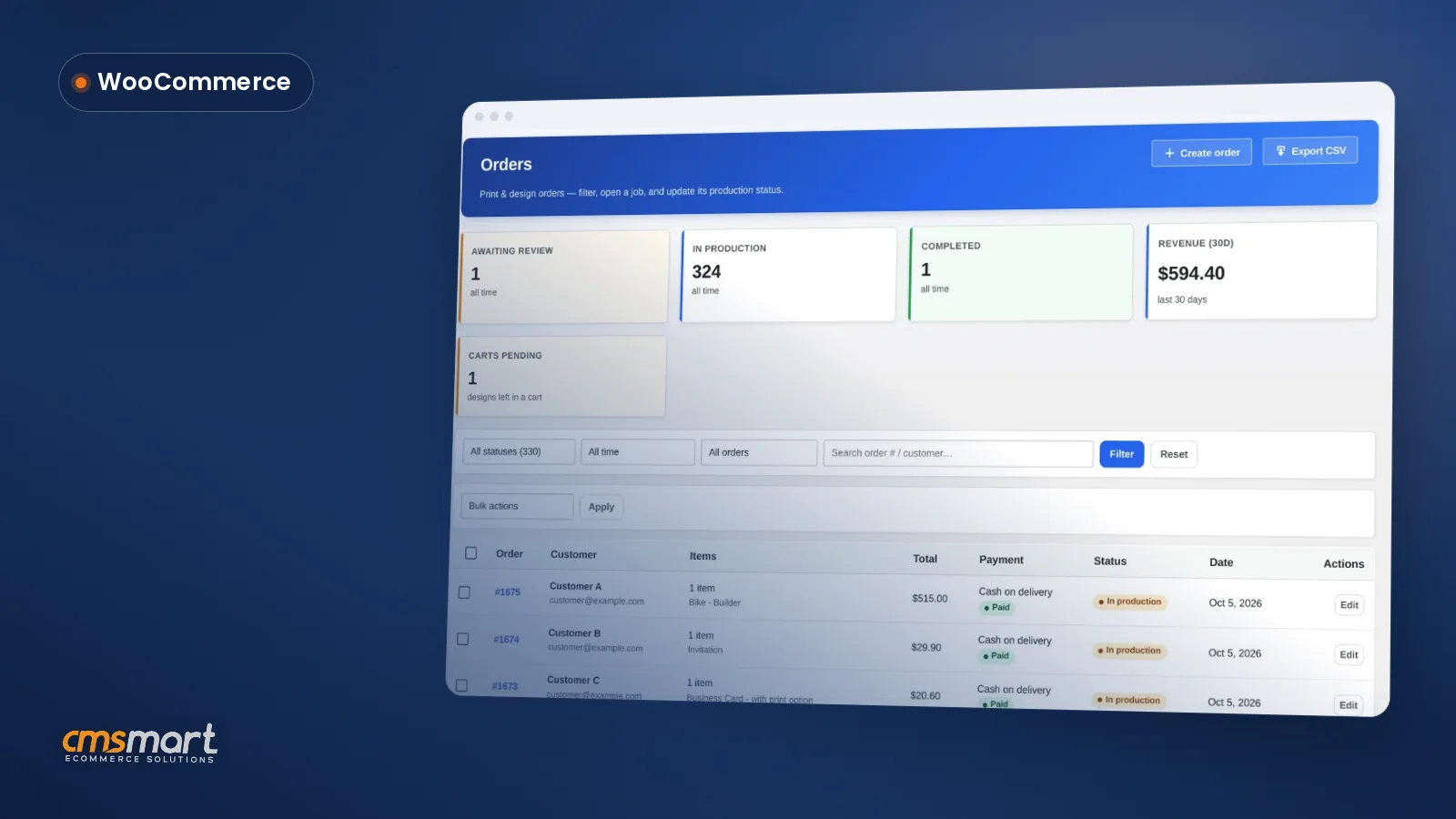
Every order, every customer record and every saved design on a Cmsmart store lives inside your own WooCommerce installation and your own license and activation records — not inside a vendor's separate dashboard you would have to beg an export from. The screenshots below are from a real demo order and a real licence screen (customer data is anonymised for this article).
Cmsmart insight: the mistake we see most often is a shop that never asks a SaaS vendor for a written export policy until the day they want to leave. Ask before you sign, not after.
What does a SaaS web to print platform give you, and what does it cost you?
A SaaS web to print platform gives a print shop a working storefront fast, with hosting, updates and (often) hundreds of pre-built integrations handled by the vendor; in exchange, the shop gives up hosting control and, usually, some flexibility over how its data can be exported.
SaaS vendors earn their fee. OnPrintShop, for example, states it has "19+" years of development behind it, serves "2000+" print businesses, and lists "300+ integrations across 9 categories" including ERP, accounting and shipping (OnPrintShop, accessed October 16, 2026) — all run as a cloud platform the vendor hosts[3]. DesignNBuy similarly runs as a cloud platform with built-in AI personalisation and 3D preview, connecting to Shopify, WooCommerce, Magento, BigCommerce and Wix stores, and states it serves "60+ countries" (DesignNBuy, accessed October 16, 2026)[4]. That breadth is real, and it is the clearest case for choosing SaaS: you get a mature catalogue of connectors without building any of them yourself.
Which print shop profile fits which model, and what could it look like day to day?
A brand-new shop with no developer usually fits SaaS best; a shop with an ERP and custom workflows usually needs self-hosted or on-premise software it can extend; and a shop that wants to keep WooCommerce, its data and its roadmap fits Cmsmart's self-hosted licensed model. Example scenario: a buyer opens the store at 10pm, designs a business card in the browser, sees the price update live from the price matrix, and pays — the print-ready PDF is already queued by the time the shop opens in the morning.
Three labelled, generic example scenarios (no real shop or person is described):
A practical, step-by-step way to decide:
OnPrintShop is best for a shop that wants a mature, all-in-one SaaS platform with hundreds of ready-made integrations and is comfortable renting its storefront. DesignNBuy is best for a brand already selling on Shopify, BigCommerce or Wix that wants to bolt on a design and pricing layer quickly. PrintXpand is best for an operation that wants a built-in print MIS and can budget for an on-premise licence. An open-source build is best for a shop with an in-house developer and no deadline pressure. Cmsmart is best for a shop that wants to keep WooCommerce, its customer list and its roadmap, while talking to an ecommerce expert about what it will need custom-built later.
Our methodology: how we compared these models
We scored open source, SaaS and self-hosted licensed software on five weighted criteria using only evidence we could cite: each vendor's own public pages, Cmsmart's 2.17.0 changelog, and real captures taken on the current demo store, all accessed or captured on October 16, 2026.
Weighted criteria, scored 1-5 per model only from cited evidence (not shown as a single aggregate "winner" — the right answer depends on your profile above):
Where a vendor does not publish evidence for a criterion, we mark it "not verified" rather than guess.
Where OnPrintShop wins
OnPrintShop's strength is maturity and breadth: "19+" years in the market and "300+" pre-built integrations across nine categories mean a shop can often connect an existing ERP or payment system without custom development, something a brand-new self-hosted build has to do from scratch (OnPrintShop, accessed October 16, 2026).
Where DesignNBuy wins
DesignNBuy's strength is platform reach: it bolts its designer and pricing layer onto Shopify, BigCommerce, Magento or Wix as well as WooCommerce, and offers a free proof-of-concept before you commit, which suits a brand that is not on WooCommerce at all (DesignNBuy, accessed October 16, 2026).
Where PrintXpand wins
PrintXpand's strength is production depth: it is the only one of the three SaaS-style vendors here that also sells a genuine on-premise licence with full source code, plus a built-in print MIS/ERP for job costing and scheduling, which suits a larger operation that wants production control without building an MIS itself (PrintXpand, accessed October 16, 2026).
What can Cmsmart build on top for a print shop with complex workflows?
Beyond the plugin's built-in designer, pricing and print-ready output, Cmsmart builds custom development for workflows no out-of-the-box platform covers: ERP and MIS sync, bespoke pricing engines, data migration from a SaaS export, and B2B approval chains — delivered through discovery, solution design, sprints, QA and launch.
Where this usually comes up for a print shop evaluating these three models:
Cmsmart delivers this the same way for every project: discovery, solution design, development sprints, QA, launch and ongoing support — see real examples on Cmsmart's ecommerce projects.
Plan my self-hosted print store
How hard is it to switch later?
Switching away from open source or SaaS into a self-hosted licensed store is a quoted migration, not a plugin install: products, print options, prices and past orders can move, while saved designs and any custom integrations need to be rebuilt or re-agreed case by case.
What typically moves in a migration to Cmsmart: product catalogue, categories, print options and price rules, and historical order records for your own reference. What typically has to be rebuilt: the design editor's saved templates (each vendor stores these differently), custom integrations specific to the old platform, and any workflow automation built on top of the old system. A short risk checklist before you commit to any move: confirm what the old platform will actually export, confirm who does the data mapping, and get a fixed-scope quote rather than an open-ended one. See Cmsmart's migration and platform-rescue service for how this is scoped.
Why Cmsmart for a self-hosted print store?
Cmsmart has built ecommerce and web to print stores as a Netbase JSC division since 2012, with 6,300+ client projects and 1,800+ live stores to date, rated 4.2 on Trustpilot from 404 reviews — proof that a self-hosted, licensed model can be supported at scale, not just a one-person plugin.
Cmsmart is part of Netbase JSC, in business since 2012, with 6,300+ client projects and 4,600+ projects delivered to date across 80+ countries, including 500+ custom development projects (Cmsmart's web to print solutions). Cmsmart is rated 4.2 out of 5 from 404 reviews on Trustpilot (accessed October 16, 2026). See related work on the Cmsmart Product Designer plugin page, and two related reads: choosing the best web to print software and building a web to print storefront.
Sources and facts last checked
Every competitor fact above is sourced to that vendor's own public page, and every Cmsmart fact is checked against the 2.17.0 changelog, a real capture, or Cmsmart's own published figures — all current as of this list.
Facts last checked: October 16, 2026.
OnPrintShop, DesignNBuy and PrintXpand are trademarks of their respective owners; naming them here is for comparison only, with no affiliation implied.
Frequently asked questions
Is Cmsmart web to print software open source?
No. It runs on WooCommerce, an open-source platform, and is licensed per plan; you host the store and own the data. Every plan starts with a free 30-day trial.
Is Cmsmart a SaaS?
No. The store is self-hosted on WordPress and WooCommerce, on hosting you choose. Updates are delivered through your licence key, not a vendor's hosted account.
Is there free web to print software?
Free tools exist for single parts of the job, such as a basic designer or an upload form. A complete print store — options, live prices, artwork approval and print-ready files — is commercial work on every model. Try Cmsmart free for 30 days.
Can I move from a SaaS platform to Cmsmart?
Yes, as a quoted migration: products, options, prices and past orders can move; saved designs are agreed case by case. See the migration service pages for how this is scoped.
What does self-hosted cost besides the licence?
Your own domain and hosting, AI tokens beyond the plan allowance, any paid third-party plugins, and custom development work.