

Guide · B2B
WooCommerce Amazon Etsy Sync: Stock and Orders
WooCommerce Amazon Etsy sync guide: keep stock and orders right across channels, avoid overselling, and get a custom integration quote.
Build a custom quote form print orders WooCommerce buyers use for bulk jobs, answer requests in wp-admin, and convert accepted quotes into paid orders.
Table of contents
Was this tutorial helpful?
Written by
Cmsmart B2B Commerce & Operations Consultant
Designs B2B ordering, marketplaces and the operations behind them.
The team behind it
 Account Manager
 Project Manager
 Business Analyst
 Developers & QA
Guide · B2B
WooCommerce Amazon Etsy sync guide: keep stock and orders right across channels, avoid overselling, and get a custom integration quote.
Guide · B2B
Set up a WooCommerce request a quote B2B workflow: price matrix, approval, and one-click conversion to order. Plan yours today.
Guide · B2B
WooCommerce B2B pricing: give wholesale buyers tiered prices, customer groups and account approval. See what the plugin does today and get a custom qu...

Cmsmart Ecommerce provides custom ecommerce and WooCommerce development services for web-to-print, product personalization, plugin support and API integration.
Cmsmart B2B Commerce & Operations Consultant
Designs B2B ordering, marketplaces and the operations behind them.
Meet the team →
In short
A buyer who wants a bulk run of gang-sheet transfers or a custom banner job won't add a guessed price to their cart, and your product page can't show one either. A custom quote form print orders WooCommerce buyers fill in on that same page lets them describe the job, lets your team price it properly, and lets the accepted quote become a real order without retyping a thing.
Why does quoting large print orders by hand cost you sales?
Cmsmart Product Designer replaces the guesswork of email-based quoting with a built-in Request a Quote button, a form you control, and a Custom quotes dashboard, so a large or bespoke print order gets priced and tracked inside the same WooCommerce admin you already use.
Cmsmart insight: the two settings that hide the price and hide the Add to cart button are separate switches that both say "for all products which enable Get quote" — turn on only one and a quote-only product still shows a price next to a Get a quote button, which reads as a bug to a first-time buyer.
What would it look like if every bulk print buyer got an instant, trackable quote?
With Cmsmart Product Designer, a buyer fills in a short form on the product page or at checkout, your team sees the request land on a live Quote Requests dashboard with its estimated value, and answering it is a status change away from becoming a paid, production-ready WooCommerce order.
Instead of an email thread, the buyer sees a Get a quote button where the price would be, answers the fields your team needs — quantity, finish, artwork, deadline — and gets a confirmation. Your team opens Cmsmart > Custom quotes the next morning, sees what's new and what it's worth, prices the job, and sends the quote back. The buyer accepts and pays it like any other WooCommerce order, design and print options attached.
Example scenario: a regional print shop gets a Friday-evening request for a large banner run through its Get a quote button. On Monday, the Pending value card shows it's still awaiting a decision; a staff member checks the artwork notes, emails back a price from the quote screen, and the buyer accepts and pays from My Account on Tuesday — one thread, one record, no re-keyed order.
How does Cmsmart turn a quote request into an order-ready workflow?
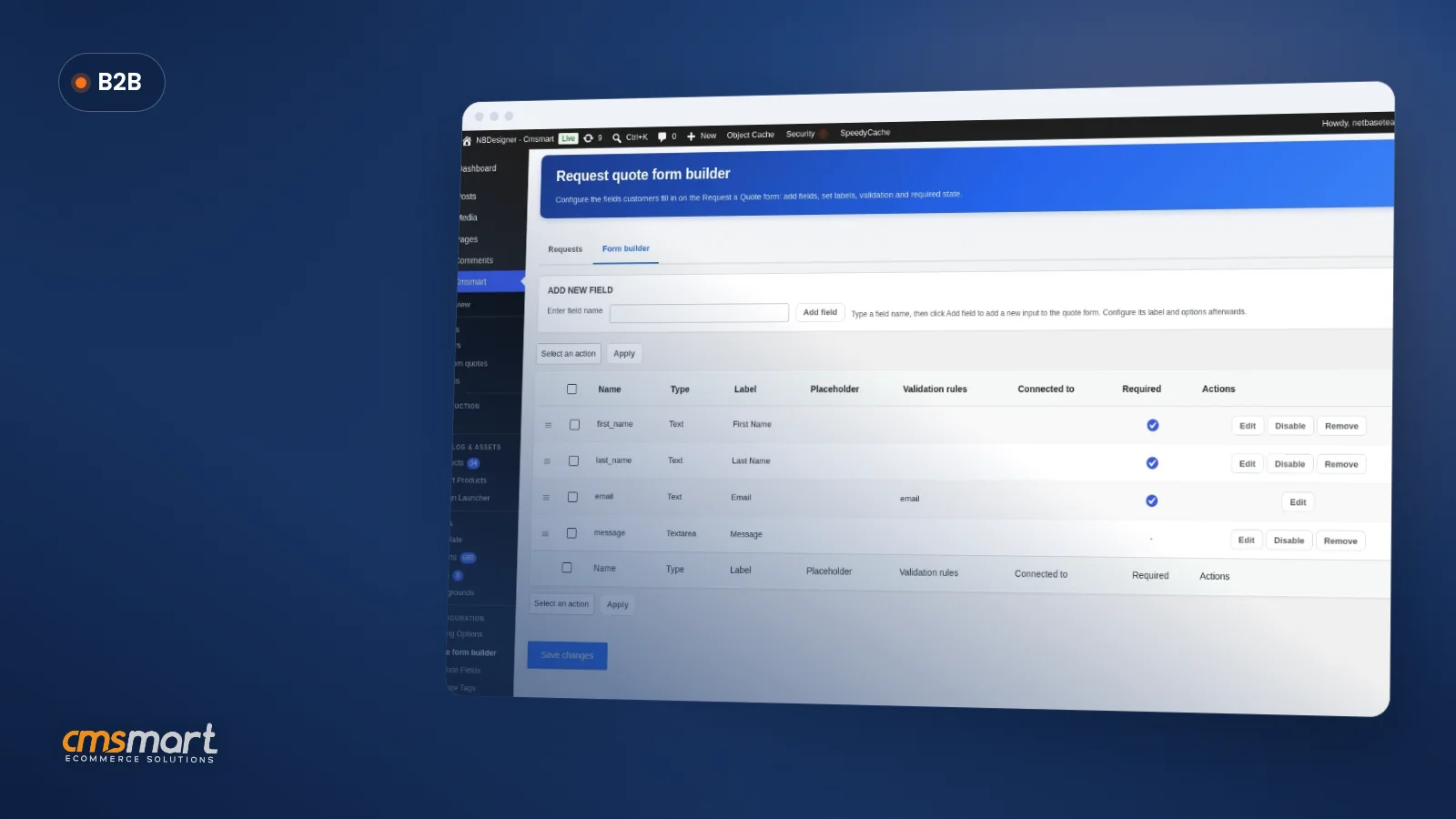
Cmsmart Product Designer connects four pieces already in your WooCommerce admin: the product's Request Quote toggle, the Form Builder that defines what you ask, the Custom quotes dashboard that tracks every request, and WooCommerce's own order flow that an accepted quote feeds into.
What's the business value of a faster quote-to-order workflow?
Cmsmart Product Designer turns quote handling into a measurable part of your sales process — every request has a status and an estimated value on the Requests dashboard, so slow answers, lost requests and re-keying errors become KPIs you can actually track and fix.
Rough-cut ROI worksheet: (quotes per month) × (hours saved per quote vs. email) × (loaded staff hourly cost) = admin time recovered. Add (quotes per month) × (reply delay in days) × (estimated buyers lost per extra day) × (average order value) to see what a same-day reply is worth in orders, not just hours.
Get a quoting workflow built for my store
How do you set up a custom quote form print orders woocommerce workflow?
Setting up Cmsmart Product Designer's quote workflow means configuring Settings > Request Quote, building your fields in the Form Builder, turning the feature on for the products that need it, then working requests from the Custom quotes dashboard through to a paid order.
Start from the installation and setup guide if Cmsmart Product Designer isn't configured yet, then follow these three stages.
Stage 1 — Build the quote form
Stage 2 — Turn it on per product, then receive and answer quotes
Stage 3 — Convert the accepted quote into an order
If your pricing already leans on a price matrix for standard sizes, the price matrix tutorial covers the formula side that a quote form is built to complement, not replace.
What can Cmsmart build on top of the standard quote form?
Beyond the built-in Request a Quote button and form builder, Cmsmart builds custom development for stores whose quoting needs outgrow a single admin queue — approval chains, ERP-synced pricing and sales-rep routing among them — scoped and delivered as a project, not a plugin setting.
Every build follows the same delivery path: discovery call, solution design, sprints, QA, launch and ongoing support — see how that looks on real Cmsmart ecommerce projects.
Plan my B2B quoting workflow
Why work with Cmsmart on your B2B quoting workflow?
Cmsmart (a Netbase JSC division, formerly NBDesigner, building web-to-print software since 2012) has shipped Request a Quote as part of Cmsmart Product Designer for WooCommerce across thousands of stores, and backs it with the same team that builds the custom quoting logic larger print businesses ask for.
Cmsmart has delivered 6,300+ client projects and keeps 1,800+ stores live today, with a 4.2-out-of-5 rating from 404 reviews on Trustpilot. One five-star review sums up why stores stick around: "we have had the NB Designer plugin installed for three years and have experienced absolutely no problems… it is wonderful to see their commitment to continuous development" — Web Developer, Trustpilot review. See the full feature set on the B2B Request a Quote product page, browse pricing and options tools for catalogue products, or see quoting inside the wider B2B web-to-print portal for buyers who also need company accounts.
Frequently asked questions about WooCommerce quote forms for print orders
Does a custom quote form replace Cmsmart's price matrix and printing options?
No. A price matrix prices jobs a formula can express — standard sizes, papers, quantities. Request a Quote covers jobs that don't fit a formula, like a custom-size run or a one-off finish, and the two run side by side on different products.
Can we hide the price and Add to cart button only on quote products?
Yes. Cmsmart > Settings > Request Quote > General has separate "Hide Add to cart button" and "Hide the price in product detail page" switches, both scoped to products with Get quote enabled.
How does an accepted quote become a paid order?
Once your team marks a quote Accepted, the buyer pays it from My Account like a standard WooCommerce order, with the quoted price, print options and any attached design carried over.
Can a buyer request a quote for their whole cart instead of one product?
Yes, if "Show button request quote in checkout page" is turned on in Settings > Request Quote > General. The buyer sends everything in their cart as one combined quote instead of checking out.
What if we need approval chains or ERP-synced pricing for quotes?
That's custom development: Cmsmart builds approval routing, ERP or MIS price sync and sales-rep assignment on top of the standard quote form for stores whose volume outgrows a single shared queue.